Welcome
Welcome to Kingbarth
We're delighted you've chosen to stay with us.
We hope you enjoy a relaxing stay in this beautiful corner of Cornwall. This guide contains everything you'll need during your visit.
Arrival
Welcome to Kingbarth
We hope you have a wonderful stay. Here are a few essentials to help you settle in.
Address
Kingbarth, Lerryn, Cornwall, PL22 0NP
Please park only in the designated private parking area.
The country lanes approaching Kingbarth are narrow in places, so we recommend following the directions provided by your booking agent rather than relying solely on satellite navigation.
Wi-Fi
Getting connected
Complimentary high-speed Wi-Fi is available throughout the cottage.
Network: Kingbarth
Password: Kingbarth1
Please note: The password begins with a capital K.
Please do not reset or unplug the router, as this may interrupt the connection.
Heating
Hot Water and Heating
The hot water and central heating controllers are located in the downstairs hall.
Hot water is available continuously throughout your stay.
Central heating is programmed to come on automatically in the mornings and evenings to keep the cottage comfortable.
If you would like to change the temperature for a period, you can use the Temperature Hold function described below.
Temporarily changing the temperature
- Use the Left and Right buttons to select HOLD.
- Press the ✓ Tick button to confirm.
- Use the Up and Down buttons to choose how long you want the Hold to last.
- Press the ✓ Tick button to confirm.
- Use the Up and Down buttons to select your preferred temperature.
- Press the ✓ Tick button again to start the Hold.
The display will show HOLD LEFT together with the remaining hold time. When the selected time has elapsed, the heating automatically returns to its normal programme.
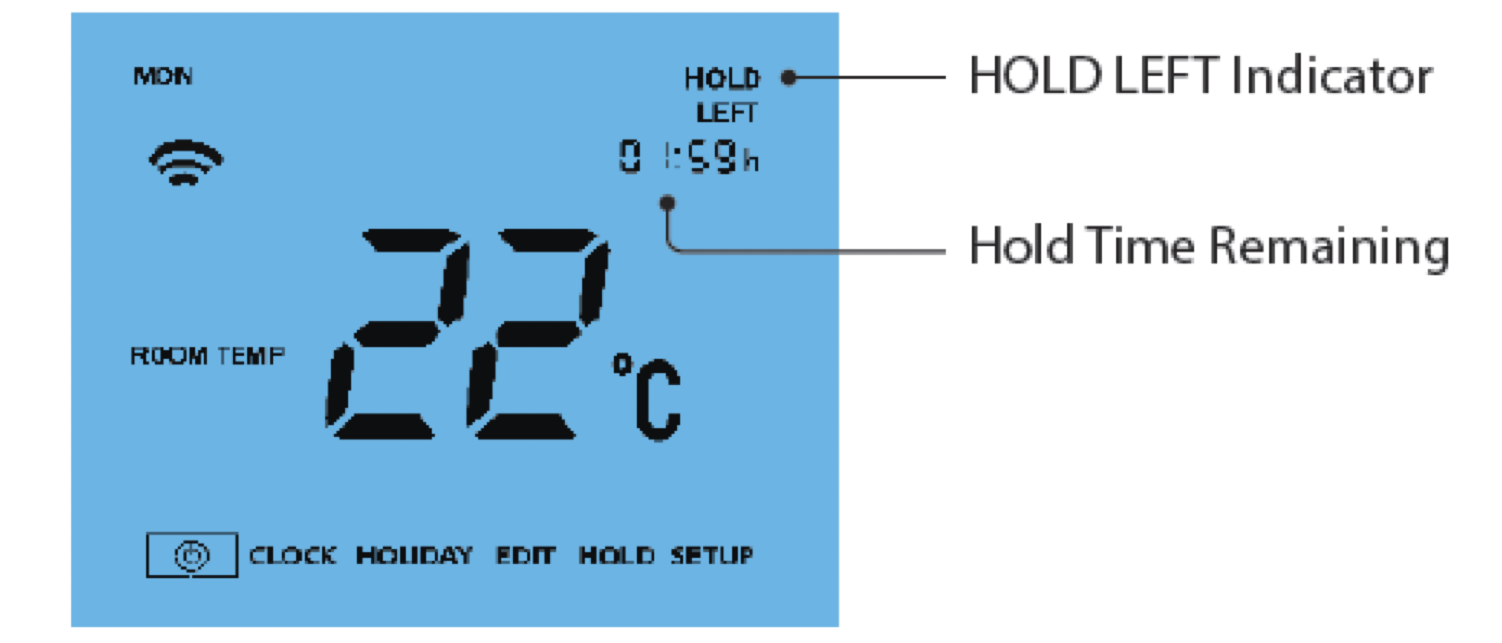
To cancel the Hold early, repeat the steps above and set the Hold time to 00:00 hours.
Television & entertainment
Television instructions
The television is normally left powered on in standby mode, allowing the remote controls to turn it on and off.
If the television has no power
- Locate the five buttons behind the bottom right-hand corner of the television.
- Press the bottom button to switch the television's main power on.
- Leave this main power on so the television remains available in standby.
Watching normal television
Use the Panasonic remote. Press the TV input button at the top right of the controller.
Using Amazon Fire TV
- On the Panasonic remote, press AV.
- Select HDMI 3.
- Use the Amazon Fire remote to choose TV channels, Netflix and other available apps.
- Voice control can be used to search for channels and programmes.
Please sign out of any personal streaming accounts before departure.
Wood burner
Lighting the stove
Please feel free to use the wood burner during your stay. Logs are provided in the garage. Kindling is available from the village shop if required.
- Open both air controls (Fig A and Fig B).
- Light a small fire using dry kindling and small logs.
- Once the fire is burning well, close the door.
- When the chimney has warmed up, close the ignition vent (Fig A).
- Control the fire using the air control (Fig B).
- Add logs only when a good bed of glowing embers has formed.
Please note
- Never leave the ignition vent (Fig A) open once the fire is established.
- Never allow the stove or flue to glow red.
- The fire should burn with bright, lively flames.
EV charging
Charging your vehicle
Follow the Go Zero guest instructions. The charger can be accessed through the supplied QR code or charging link.
Before you leave
Departure checklist
Before setting off, we'd be grateful if you could help us by completing the following:
- Sign out of any personal streaming accounts.
- Leave the television in Standby (please do not switch it off at the mains).
- Place rubbish and recycling in the designated bins.
- Close all windows and lock external doors.
- Return the keys as instructed in your booking information.
Thank you for staying at Kingbarth. We hope you've had a wonderful visit and look forward to welcoming you again.